Cremine Keynote Template: A Flexible Design Tool
Creating a compelling presentation often feels like a balancing act between visual appeal and content clarity. For many professionals, the design phase consumes valuable time that could be better spent refining the message itself. This is where pre-designed templates become essential tools rather than just shortcuts. The Cremine - Keynote Template offers a structured yet adaptable foundation for anyone looking to streamline their slide creation process without sacrificing aesthetic quality.
At its core, this template is a collection of 150 total slides, organized into five premade color schemes. It is built on master slides, which means that changes made to the layout automatically propagate throughout the document. This technical detail matters significantly for users who need consistency across dozens of pages. Whether you are preparing a quarterly business review or a personal portfolio, the ability to maintain uniform typography and spacing with minimal effort is a major advantage.
Why Design Flexibility Matters for Different Users
The value of a template like Cremine varies depending on who is using it and what they hope to achieve. A freelance marketer might prioritize speed and brand alignment, while an educator might focus on readability and structural clarity. Understanding these differing priorities helps in determining if this specific tool fits your workflow.
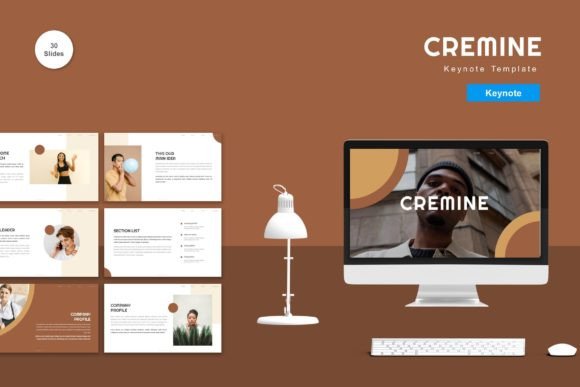
For entrepreneurs and small business owners, time is often the scarcest resource. When pitching to investors or presenting to clients, the visual polish of your deck can influence perceived credibility. The Cremine template includes thirty useful slides designed for common business scenarios, such as team introductions, data visualization, and project timelines. Because all elements are editable, you can input your content, replace placeholder images with your own photography, and adjust colors to match your brand identity. This level of customization ensures that the presentation feels bespoke rather than generic.
Creative professionals and designers may approach templates with skepticism, worrying about creative constraints. However, vector-based assets offer a different proposition. Since the graphics are scalable and editable, they serve as a starting point rather than a final product. You can modify shapes, change icon colors, and rearrange layouts to suit specific artistic visions. The inclusion of recommended free web fonts also ensures that the typography remains accessible and legally safe for commercial use, removing a common hurdle in professional design work.
Ease of Use for Beginners and Non-Designers
Not everyone has extensive experience with presentation software. For students, educators, and hobbyists, the learning curve of advanced design tools can be intimidating. The drag-and-drop functionality of the Cremine template lowers this barrier. Users do not need to understand complex layering or masking techniques to create a visually appealing slide. They simply select a layout, drop in their text and images, and the template handles the alignment and spacing.
This ease of use extends to the animated slides included in the package. Animation can enhance engagement when used correctly, but it can also distract if overdone. The pre-built animations in this template are designed to be subtle and professional, guiding the audience’s attention without overwhelming them. For a teacher creating lecture materials, these animations can help reveal information step-by-step, aiding student comprehension. For a blogger presenting at a conference, they add a dynamic element that keeps the audience engaged.
Technical Features and Practical Application
To fully leverage the potential of this template, it is helpful to understand its technical specifications. The package includes five Keynote files, each corresponding to one of the five premade colors. This separation allows users to choose the mood that best fits their topic. A bright, energetic color scheme might suit a product launch, while a muted, professional palette may be more appropriate for a financial report.
- Master Slides Based: Ensures global consistency in fonts, colors, and positioning.
- Vector Based: Allows for infinite scaling without loss of quality, ideal for large screens or printed handouts.
- Widescreen Format: Optimized for modern displays and projectors, ensuring your content fills the screen appropriately.
- Editable Elements: Every shape, icon, and text box can be modified to suit specific needs.
The inclusion of a readme file is a small but significant detail. It provides guidance on how to get started, which is particularly useful for those new to Keynote. It clarifies that preview images are not included, managing expectations right from the start. This transparency helps users focus on the functional aspects of the template rather than getting distracted by stock photography that serves only as a placeholder.
Evaluating Fit for Your Specific Needs
When deciding whether to adopt the Cremine template, consider your primary goals. If you value speed and efficiency, the pre-made structures will save hours of formatting time. If you prioritize brand consistency, the master slide feature ensures that every slide adheres to your visual guidelines. For those focused on learning and development, studying how the template is constructed can provide insights into good design principles, such as whitespace usage and hierarchy.
However, it is important to recognize that no template is a one-size-fits-all solution. If your presentation requires highly specialized diagrams or unconventional layouts, you may find yourself spending more time modifying the template than building from scratch. In such cases, the template serves best as a source of inspiration or a library of reusable components rather than a complete framework.
For marketers and publishers, the ability to quickly iterate on designs is crucial. Being able to swap out colors and images allows for A/B testing different visual approaches to see what resonates with the audience. The flexibility of the vector assets means that icons can be recolored to match campaign-specific themes, adding a layer of cohesion to broader marketing efforts.
Making the Most of Your Presentation Tools
Ultimately, the effectiveness of any presentation depends on the clarity of the message and the confidence of the presenter. Tools like the Cremine - Keynote Template support this by removing technical friction. When you are not worried about aligning text boxes or choosing font pairs, you can focus on storytelling and delivery.
Remember that the template is just a vessel. Its true value emerges when you infuse it with your unique content and perspective. Take the time to read the included instructions, experiment with the different color schemes, and customize the elements to reflect your personal or brand identity. By doing so, you transform a generic set of slides into a powerful communication tool tailored to your specific audience.
Whether you are a freelancer looking to impress a new client, an educator aiming to engage students, or a business owner preparing for a major pitch, having a reliable, flexible, and professional template in your arsenal can make a significant difference. The Cremine template offers a balanced mix of structure and freedom, allowing you to present your ideas with clarity and style.