Evaluating Bornea: A Versatile PowerPoint Template for Business and Personal Use
Creating a compelling presentation requires more than just accurate data; it demands visual clarity, structural coherence, and design consistency. For professionals, entrepreneurs, and students who lack the time or expertise to build slide decks from scratch, pre-designed templates offer a practical solution. Bornea - Powerpoint Template is one such resource designed to streamline the creation process while maintaining a professional aesthetic. This article explores the features, benefits, and limitations of this template to help you determine if it aligns with your specific presentation needs.
Understanding the Core Offering
At its foundation, Bornea is a comprehensive slide deck package built for Microsoft PowerPoint. It is not merely a collection of static images but a fully functional, editable framework. The template includes 150 total slides, organized across five premade color variations. This volume ensures that users have access to a wide array of layout options, from title slides and agenda overviews to complex data visualization charts and team introduction pages.
The design philosophy behind Bornea emphasizes flexibility. All elements within the template are fully editable, allowing users to input their own content, replace placeholder images, and adjust colors to match brand guidelines. Furthermore, the inclusion of animated slides adds a dynamic layer to presentations, helping to maintain audience engagement without requiring advanced animation skills from the user.
Key Features and Technical Specifications
When evaluating a digital asset like Bornea, understanding the technical specifications is crucial for compatibility and ease of use. The template is vector-based, which means that graphics and icons can be resized without losing quality. This is particularly important for high-resolution displays or large projection screens where pixelation can detract from professionalism.
- Volume and Variety: With 150 total slides and 30 uniquely useful layouts, the template covers most standard presentation scenarios.
- Color Flexibility: Five premade color schemes allow for quick customization. Users can switch between these themes to suit different moods or corporate identities.
- Master Slide Integration: The template is built on master slides, ensuring that changes made to the global design—such as font styles or logo placement—are automatically applied across all slides.
- Typography: It utilizes recommended free web fonts, eliminating licensing issues and ensuring that the text remains legible and consistent across different devices.
- File Format: The download includes five PPTX files, compatible with modern versions of Microsoft PowerPoint.
The "drag and drop" functionality is a significant usability feature. By simplifying the process of adding images and text, the template reduces the learning curve for users who are not graphic designers. Additionally, the inclusion of a readme file provides essential guidance on how to best utilize the template’s features, ensuring a smoother onboarding experience.
Benefits for Different User Groups
The versatility of Bornea - Powerpoint Template makes it suitable for a broad audience. For business professionals, the clean lines and structured layouts facilitate clear communication of quarterly reports, project proposals, and strategic plans. The ability to quickly swap out placeholder images and adjust colors means that teams can maintain brand consistency without hiring external designers.
For educators and students, the template offers a balanced approach between creativity and structure. The animated slides can help highlight key concepts during lectures or thesis defenses, while the variety of layouts allows for the effective display of research data, timelines, and comparative analyses.
Personal users, such as those creating portfolios or planning events, may also find value in the template. The aesthetic is modern enough to feel contemporary but neutral enough to adapt to personal branding or casual topics. The widescreen format ensures compatibility with modern laptops and monitors, which is increasingly the standard for both professional and personal viewing.
Considerations and Potential Tradeoffs
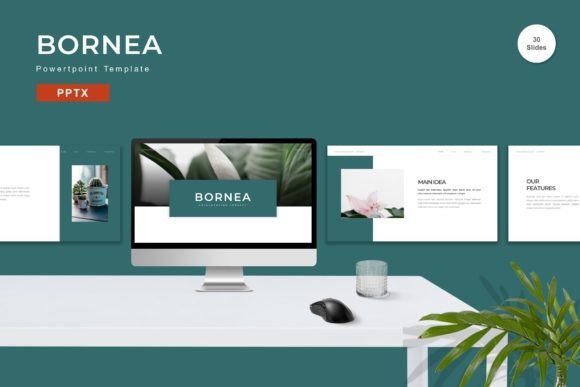
While Bornea offers extensive features, it is important to approach it with realistic expectations. One notable consideration is that preview images are not included in the final download. This means that users must rely on the product listing images for initial assessment and cannot use those specific visuals in their final presentation. Users must source their own imagery, which can be a time-consuming task if high-quality stock photos are required.
Additionally, while the template is described as "easily editable," achieving a truly custom look may still require a basic understanding of PowerPoint’s interface. Users unfamiliar with master slides or vector editing might find themselves limited to the default layouts unless they invest time in learning these tools. The five premade colors provide a good starting point, but users seeking highly specific brand colors will need to manually adjust the theme colors, which is a straightforward but necessary step.
Another factor to consider is the file size and performance. With 150 slides and embedded animations, the PPTX files may be larger than minimal templates. Users working on older hardware or with limited storage should ensure their systems can handle the file weight smoothly, although vector-based designs generally optimize well for performance.
When Is Bornea a Strong Fit?
This template is an ideal choice for individuals and teams who need to produce polished presentations quickly without sacrificing design quality. It is particularly strong for:
- Corporate Environments: Where consistency, professionalism, and brand alignment are critical.
- Consultants and Freelancers: Who need a versatile toolkit that can be adapted for various clients and industries.
- Educational Settings: Where clear information hierarchy and engaging visuals support learning outcomes.
If your goal is to reduce the time spent on formatting and focus more on content delivery, Bornea provides a robust framework that supports this objective. The inclusion of animated slides also makes it a good fit for presenters who want to add a layer of interactivity without complex coding or third-party software.
When to Consider Alternatives
Despite its strengths, Bornea may not be the best solution for every scenario. If you require highly specialized industry-specific diagrams—such as detailed engineering schematics or medical illustrations—you may need to supplement this template with additional resources or choose a niche-specific template. Similarly, if you prefer a minimalist aesthetic with very few slides, a 150-slide package might feel excessive, and a smaller, more focused deck could be more efficient.
Users who rely heavily on Google Slides or Keynote should also note that this template is designed specifically for PowerPoint (PPTX). While conversion is possible, formatting issues often arise when moving complex PowerPoint templates to other platforms. In such cases, seeking a native template for your preferred software might save time and frustration.
Making the Final Decision
Choosing the right presentation template is about balancing convenience with customization. Bornea - Powerpoint Template offers a compelling mix of quantity, quality, and ease of use. Its vector-based design, master slide integration, and animated elements provide a solid foundation for professional-grade presentations. However, success with this tool depends on your willingness to engage with its features—replacing placeholders, adjusting colors, and sourcing appropriate imagery.
Before purchasing, assess your current workflow. Do you frequently struggle with design consistency? Do you need a wide variety of layouts to handle different types of content? If the answer is yes, Bornea represents a practical investment that can enhance your presentation capabilities. By understanding its features and limitations, you can leverage this template to create impactful, visually appealing presentations that effectively communicate your message.