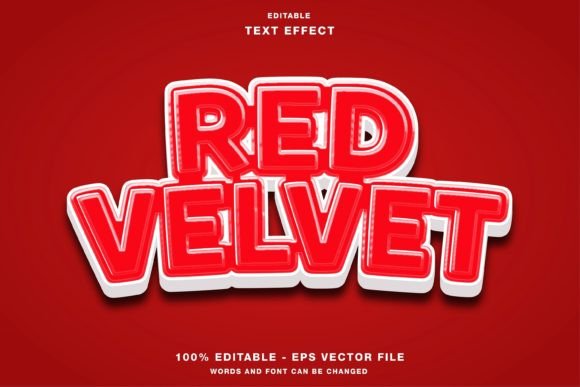
Red Velvet 3D Text Effect: A Practical Guide for Designers
Creating a headline that stops the scroll requires more than just bold fonts; it demands texture, depth, and a tactile quality that flat design often lacks. The Red Velvet 3D Text Effect offers exactly this, transforming standard typography into a rich, plush visual element that commands attention. Whether you are designing a social media promotion for Instagram or a high-impact flyer for an upcoming event, this effect adds a layer of sophistication that suggests luxury and warmth. However, like many powerful design assets, its potential is only realized when used correctly. Many creators rush to apply these effects without understanding the underlying mechanics, leading to disappointing results that fail to communicate the intended message.
Understanding the Value of Texture in Digital Typography
The appeal of the Red Velvet 3D Text Effect lies in its ability to simulate real-world materials within a digital space. When viewers see text that appears soft, deep, and textured, their brains process it differently than they do with simple vector shapes. This psychological response is why professionals frequently choose velvet textures for promotional materials related to fashion, beauty, holidays, and premium events. The specific shade of red combined with the plush gradient creates a sense of urgency and importance, making it ideal for headlines on Twitter, Facebook, or magazine covers.
This particular template is designed specifically for Adobe Illustrator, providing a fully editable structure. Unlike static image files, this asset allows you to modify every element, from the base color to the lighting angles. Because the color mode is set to RGB, it is optimized for screen-based displays, ensuring that the vibrant reds and subtle shadows remain vivid on websites and mobile devices. Understanding this distinction is crucial; using an RGB file for print without conversion can lead to dull, muddy colors, a common pitfall for beginners.
Common Mistakes When Applying 3D Text Effects
Despite the versatility of the Red Velvet 3D Text Effect, several recurring errors can undermine your design's effectiveness. One of the most frequent mistakes is treating the effect as a "one-size-fits-all" solution. Designers often download the file, type their text, and immediately export it without adjusting the lighting or shadow intensity to match their background. This results in a floating, disconnected look where the text feels pasted on rather than integrated into the composition.
Another significant oversight involves the choice of font. The velvet texture relies heavily on the weight and shape of the letters. If you select a thin, delicate script font, the 3D extrusion may become lost, and the velvet grain will not render clearly. Conversely, using a font that is too complex can make the texture appear cluttered. The effect works best with bold, sans-serif, or slab-serif typefaces that provide enough surface area for the texture to shine.
Furthermore, many users overlook the file format requirements. While the package includes both EPS and JPG files, relying solely on the JPG version limits your ability to edit the text later. The JPG is a flattened image; once exported, you cannot change the wording or the color without starting over. This lack of flexibility can be costly if a client requests a last-minute change to a campaign headline.
How These Errors Impact Your Projects
These seemingly minor decisions have tangible consequences for your work. Poor integration of the text effect reduces readability, causing your audience to miss key information. In the context of social media promotions, where attention spans are measured in seconds, a confusing or visually jarring headline can result in low engagement rates. Similarly, using the wrong color mode for print production can lead to wasted resources and unprofessional deliverables. A flyer printed with muted, incorrect reds fails to convey the energy required for an event paper or poster, potentially reducing attendance.
Efficiency is also compromised when designers do not utilize the editable nature of the template. Re-creating a 3D effect from scratch is time-consuming and requires advanced knowledge of blending modes and gradients. By failing to use the customizable features of the Red Velvet 3D Text Effect, you waste valuable time that could be spent refining other aspects of your design.
Best Practices for Using the Template
To get the most out of this resource, approach it as a flexible tool rather than a finished product. Begin by opening the EPS file in Adobe Illustrator. This ensures you retain full access to the layers, allowing you to change the text content instantly. Since the template is built for customization, you should experiment with different font pairings before finalizing your design. Select a font that complements the luxurious feel of the velvet texture while maintaining legibility.
Pay close attention to the background environment. The Red Velvet 3D Text Effect casts shadows and highlights that interact with the surrounding elements. If your background is busy or has high contrast, consider adjusting the opacity of the shadow layers or adding a subtle drop shadow to ground the text. This small adjustment makes the text feel like it belongs in the scene, enhancing the overall presentation.
Always verify your color settings before exporting. For web designs, social media posts, and digital publications, keep the document in RGB mode to preserve the vibrancy of the red hues. If you plan to use the design for physical materials like magazines or posters, convert the color mode to CMYK before printing. While the original template is RGB, converting it properly ensures that the red remains rich and true on paper, avoiding the washed-out appearance that plagues many amateur prints.
Evaluating the Asset Before You Commit
Before integrating any text effect into your workflow, take a moment to evaluate its compatibility with your specific project needs. Check the included files to ensure you have both the editable EPS source and the preview JPG. The presence of the EPS file is non-negotiable for professional work, as it guarantees future editability. Additionally, review the license terms associated with the download to confirm that you can use the effect for commercial purposes, such as client branding or paid advertisements.
Consider the scalability of the design. Vector-based templates like this one maintain their quality at any size, from a small icon on a website header to a massive billboard. This scalability is a distinct advantage over raster-based images, which pixelate when enlarged. By choosing a vector-friendly Red Velvet 3D Text Effect, you ensure that your design remains crisp across all platforms, whether it is a tiny thumbnail on Twitter or a large-format poster for an exhibition.
Final Thoughts on Customization and Quality
The power of the Red Velvet 3D Text Effect lies in its balance between pre-made convenience and creative freedom. It removes the technical barrier of creating complex 3D textures from scratch while still offering the control needed for professional-grade results. By avoiding common pitfalls like poor font selection, incorrect color modes, and ignoring the editable layers, you can create compelling visuals that elevate your brand. Remember that the goal is not just to add an effect, but to enhance communication. When used thoughtfully, this template becomes a versatile asset in your toolkit, ready to bring depth and character to your next headline, flyer, or digital campaign.