Elloco Powerpoint Template for All Needs
Creating a presentation that captures attention often feels like balancing on a tightrope between professional polish and creative flair. For many, the blank canvas of a new slide deck is less an opportunity and more a source of anxiety. The Elloco Powerpoint Template addresses this common hurdle by offering a structured yet flexible foundation designed to streamline the design process without sacrificing quality. Whether you are pitching a startup idea, teaching a complex subject, or organizing personal memories, having a reliable visual framework can transform how your message is received.
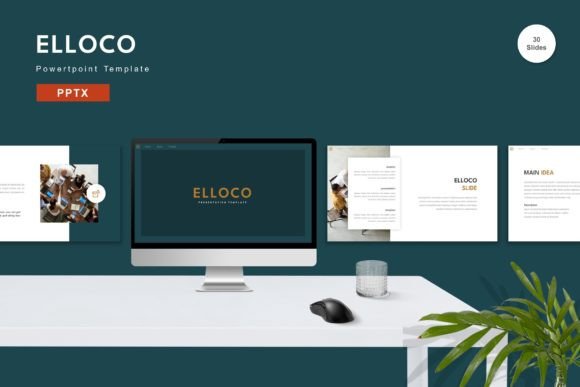
This template is not merely a collection of static backgrounds; it is a comprehensive toolkit containing 150 total slides built on vector-based master slides. This architecture ensures that every element remains crisp at any resolution and allows for deep customization. With five premade color schemes included, users can instantly adapt the aesthetic to match their brand identity or personal preference. The inclusion of animated slides adds a layer of dynamism, helping to guide the audience's focus through your narrative with smooth transitions rather than abrupt cuts.
Why Design Flexibility Matters for Everyone
The value of a tool like the Elloco Powerpoint Template shifts depending on who is using it. For a marketing manager, the priority might be brand consistency and speed. For a student, it could be about learning how to structure information logically. For a freelancer, the commercial value and ability to deliver high-end visuals quickly are paramount. Understanding these different priorities helps clarify why a single template can serve such a diverse range of users effectively.
At its core, the template solves the problem of "design fatigue." When you spend hours tweaking margins, aligning text boxes, and hunting for compatible fonts, you have less time to refine your actual content. By providing 30 useful, pre-designed layouts that cover everything from data visualization to team introductions, Elloco frees up mental energy. The recommendation to use free web fonts further reduces friction, ensuring that your presentation looks modern on any device without requiring expensive software licenses or font management skills.
Perspectives for Professionals and Business Owners
For entrepreneurs and small business owners, time is the most valuable currency. A pitch deck needs to look polished to instill confidence in potential investors, but the founder cannot afford to hire a graphic designer for every minor update. The Elloco Powerpoint Template offers a solution where all elements are editable. You can input your specific financial data, replace placeholder images with real product shots, and adjust the color palette to align perfectly with your company logo.
The widescreen format is particularly crucial here. Modern projectors and conference room monitors almost exclusively use 16:9 aspect ratios. Older templates often suffer from black bars or stretched images when projected on these screens. Since Elloco is built natively for widescreen displays, professionals can present with the assurance that their visuals will fill the screen correctly. The five premade colors allow a business owner to maintain a consistent look across different departments or seasonal campaigns simply by switching the master theme.
Consider a scenario where a consultant needs to present quarterly results to three different clients, each with distinct branding. Instead of rebuilding the deck from scratch, they can utilize the drag-and-drop functionality to swap out the primary color scheme and imagery. This flexibility turns a potentially tedious task into a streamlined workflow, allowing the consultant to focus on the strategic insights within the slides rather than the formatting.
A Creative Launchpad for Beginners and Students
Beginners and students often struggle with the overwhelming array of options available in presentation software. They may know what they want to say but lack the design vocabulary to express it visually. The Elloco Powerpoint Template acts as a mentor in this context. By following the structure of the 30 useful slides, learners can observe best practices in layout, hierarchy, and balance.
The "Readme First" file included in the package is a vital resource for this group. It guides users through the basics of editing, explaining how to change colors and replace images. This lowers the barrier to entry significantly. A student preparing a thesis defense can use the animated slides to introduce key concepts dynamically, keeping the academic committee engaged without needing advanced animation skills. The vector-based nature of the slides means that even if a user decides to crop an image or resize a chart, the quality does not degrade, which is a common pitfall for those working with lower-resolution assets.
Furthermore, the inclusion of recommended free web fonts removes the guesswork from typography. Beginners often pair clashing fonts that distract from the content. By sticking to the suggested typefaces, they ensure their work looks cohesive and professional right out of the box. This builds confidence, encouraging them to experiment with their own ideas once they understand the underlying structure.
Utility for Educators and Content Creators
Educators face unique challenges: they must convey complex information clearly while maintaining the interest of a diverse classroom. The Elloco Powerpoint Template supports this by offering varied slide types suitable for diagrams, bullet points, and multimedia integration. The ability to easily edit every element means a teacher can tailor a lesson plan for a history class one week and a science lab the next, simply by changing the imagery and text.
Content creators, such as bloggers or video producers who repurpose content into slide decks for social media, also benefit from the versatility of this tool. The 150 total slides provide a vast library of options, ensuring that no two presentations feel repetitive. If a creator produces weekly newsletters or tutorials, having a robust system like Elloco allows for rapid production schedules. The animated features can be used sparingly to emphasize key takeaways, making the content more digestible for online audiences who have short attention spans.
Evaluating Fit for Your Specific Goals
Before deciding if the Elloco Powerpoint Template is the right choice, consider your specific workflow and long-term needs. If your priority is absolute uniqueness and you require custom illustrations for every slide, you might find the pre-made nature limiting. However, if your goal is efficiency, reliability, and a high standard of design without the steep learning curve, this template excels.
Think about the technical environment you work in. Since the package includes five PPTX files, it is fully compatible with Microsoft PowerPoint, which is the industry standard. The vector-based master slides ensure scalability, meaning your work will look sharp whether viewed on a smartphone or a massive theater screen. The absence of preview images in the final download is a standard practice to keep file sizes manageable, focusing the delivery on the functional assets you need to create your own content.
Ultimately, the decision comes down to how much value you place on time saved versus total control. For most users, the sweet spot lies in a template that provides a strong starting point but allows for complete customization. The Elloco Powerpoint Template strikes this balance by offering a comprehensive set of tools—colors, animations, and layouts—that empower you to tell your story effectively. Whether you are a hobbyist documenting a travel journal or a CEO presenting a merger strategy, the ability to replace placeholders and tweak colors ensures the final result feels authentically yours.
By leveraging these features, you move beyond the stress of formatting and into the realm of storytelling. The template becomes a silent partner in your communication strategy, handling the visual heavy lifting so you can focus on the message that truly matters. In a world where attention is scarce, presenting your ideas with clarity and style is not just a nice-to-have; it is essential. Elloco provides the foundation to make that happen.